I can see some pixelation in highlight areas with contrast. Next to the pixelation there are small artifacts.
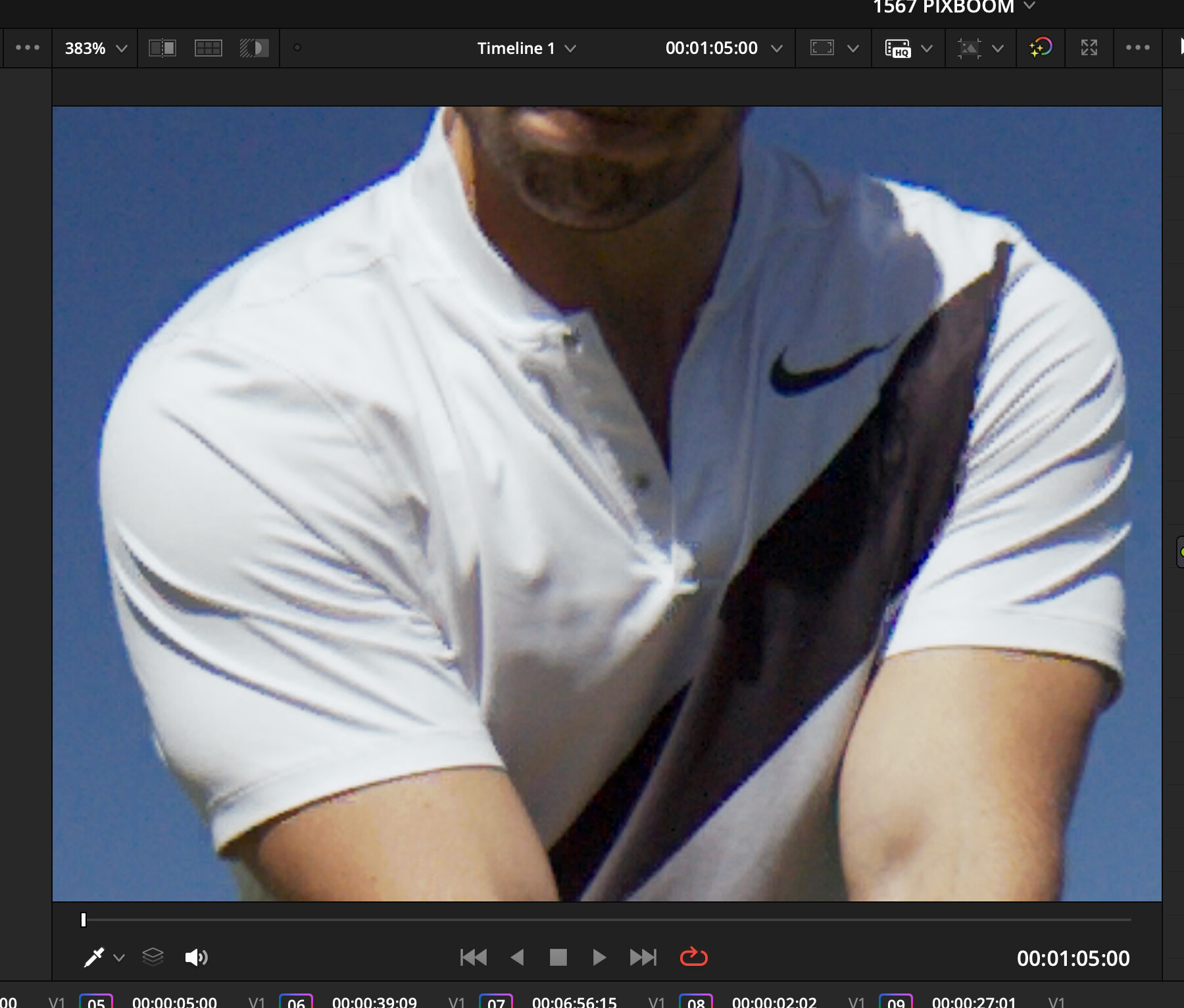
As far as I remember right kinefinity’s cDNG files had the same problem only in Davinci Resolve. There seems to be a problem with Demosaic process inside Davinci. Someone should try another software to demosaic like Scratch or some other.
On the other hand the internal ProRes Files didn’t have any issue at all with the demosaic.
Maybe an OLPF is the solution here, looks like moiré. In the right shoulder you can see that fine details have this steps too.
Yeah, I suggested an OLPF back around April/May. I hope they reconsider it or can make it an add on filter that we can swap and take out easily.
If the debayer/demosiac process is alright with other software like Scratch or Adobe, an OLPF might not be necessary. Hard to say, since there hasn’t been deep technical testing.
You are right. It’s a Davinci demosaic problem. Opened a file in photoshop and no more artifacts, but even better, the black dead pixels are gone :).
But don’t want to change software, since Davinci gives me by far the best color.
2 Likes
So it’s the same dead end …. I think the problem is, that Davinci optimized or changed its debayer/demosaic towards the optimization of their own cameras who shot cDNG in the early days and since then never touched it again.
Since Blackmagic won’t move on this topic, the question is, if an OLPF will help, because the sensor resolution and pixel size reminds me of the URSA 4.6K G2, which also had moire issues.
I think the smartest ways is to ship with an OLPF built in, designed for this sensor specifically.
Or to go with ProRes, Kinefinity did the same, since the internal debayer/demosaic was way better. This is going to be an issue, since a lot of people use Davinci.
2 Likes
Good find! It looks like it does get rid of the black dead pixels in Photoshop!
There is no other real option with cDng than Davinci. Adobe is not great handling nonAdobe dng’s.
DJI , Sigma, Chronos, and others made cDng it work in Davinci, so should pixboom.
1 Like
You are right, I think an OLPF should solve this, if a proper software solution does not work. It has to be further investigated:)
1 Like
As I understand a OLPF solves problems like moire, but not demosaic issues as we currently see. The problem should be solved while transcoding into cDNG in the pixboom software.
Yes, Kinefinity did the right thing they gave us 4444xq with a good log curve and achieved one of the best clean color out there. Pixboom should give more transcode options, maybe some people want to make a quick H265 and so on.
3 Likes
I’ve had some success using a custom combo IR/OLPF filter made for my Chronos 1.4 slowmotion camera. It fits right over the sensor where the stock IR filter is. It helps to reduce aliasing/moire a bit so it’s not as obvious. It doesn’t completely eliminate it since the Chronos 1.4 is a much lower resolution camera with bigger pixels for it’s sensor size, but it should be more effective on a 4K sensor. Maybe Pixboom can try talking to Rawlight or Kolari as they make pretty good OLPF’s for a variety of cameras like Panasonic and Blackmagic.
@Young when you did OLPF testing a few months ago, did you use torture charts to see how effective the OLPF is? This is really the only way to see how prone the Spark is to aliasing/moire. I know that the Freefly Ember has problems with aliasing/moire with very fine detail due to it not having an OLPF.
You are absolutely right. I remember Kinefinity couldn’t solve it. An OLPF is not the answer to cDNG problem but might „help“ to make it usable. But you are right, it is not the solution, if the demosaic is clean with other software.
1 Like
Any more info on this?
I wonder if the issue he described in this video (which apparently was fixed with a firmware patch) is the same?
YouTube
1 Like
Good point. It very well could be.
is there a better 3rd party plugin to Davinci Resolve for demosaic from cDNG? I would love one with settings.
1 Like
Not that I know of. Sorry.