Hi everyone,
During a shoot yesterday in a complex environment (lots of obstacles and wireless interference), the Spark’s built-in wireless connection to my iPad was inconsistent and dropped at times. I’d like to set up a more reliable connection over a longer distance.
The setup I’m considering:
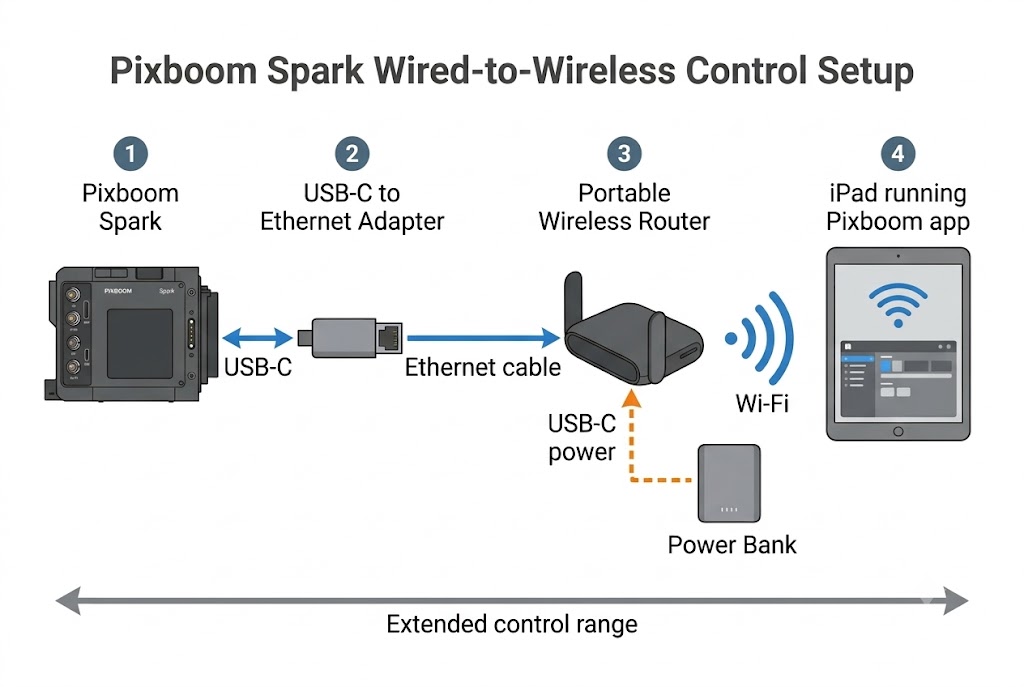
- Connect a USB-C to Ethernet adapter to the Spark.
- Run an Ethernet cable from the adapter to a portable wireless router (powered by a USB-C power bank) which has strong Wifi 6 or 7 .
- Connect my iPad to that router’s Wi-Fi network and control the Spark from the Pixboom app.
My questions:
1. Does the Spark support wired Ethernet communication through a USB-C to Ethernet adapter?
2. If this setup isn’t supported, do you have any other recommendations for improving range and connection stability in difficult environments?
Thank all!
_
This is my diagram. I’m curious if Pixboom Spark is supported.