NYC Spark Workshop

Hi Everyone,

Last night, Ryan from Revar Cine and Tokina hosted a Spark workshop in New York City, bringing together some of the industry’s top DPs, ACs, and content creators interested in the latest developments in high-speed cinema.

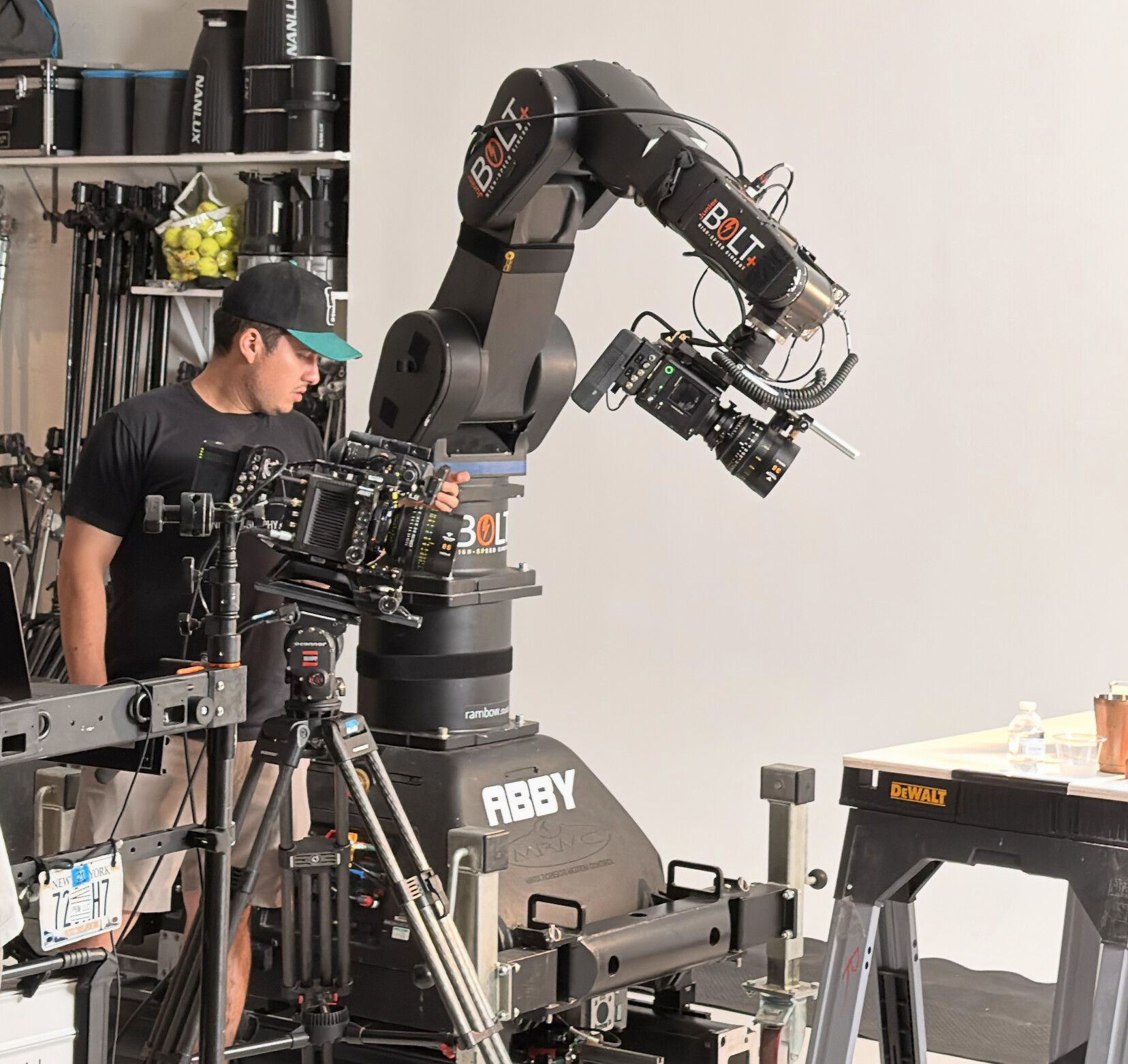
A special thank you to Nick Debas for leading the workshop, shooting, and showing us the potential of the Spark in action. We also have to thank Rainbow Studios for providing both the location and the Bolt cinema robot.

Revar Cine invited me to participate as another voice for the Spark and to bring my own Spark body for attendees to see and use. It was a great opportunity to meet and share what I have learned to other filmmakers interested in incorporating the Spark into upcoming projects. 

What stood out most to me was that many attendees already understood the advantages the Spark offers over similar cameras on the market, such as its BSI sensor and Global shutter. Everyone was eager to get their hands on one for their own productions.

The demonstration Nick set up featured a bartender pouring ice and a liquid into a glass. An ARRI camera was set up on a tripod at 200 fps as a comparison shot; the Spark was mounted on the Bolt robot and filming at UHD 4K 937 FPS, setting us up for a dynamic arc movement around the glass. While looking at both cameras on the monitor, they showed some color differences between the Arri and Spark sensors… However…

After the shot, Nick pulled footage from both cameras and performed a live color match between the ARRI and the Spark. While the workflow will continue to be refined, I was impressed that he was able to achieve roughly a 90% match in just 2-3 minutes on his laptop using Davinci. 

Overall, it was exciting to see such strong interest in the Spark and its potential for immediate use in productions. 

Different DP’s of various backgrounds all got to have a look at my camera and do a little test shooting of their own. The most common feedback I heard throughout the evening was how easy the camera is to use, and its build/form factor is perfect for rigging out. 
Other comments were echoes of what we have already asked from Pixboom…

Listed in order of importance.

  • SDI
  • Mobile / Web portal for Live review / Control 
  • Log output for use on monitors so the Dynamic Range matches on monitors such as Small HD and subsequently false color is more accurate.
  • In-body exposure tools such as false color … peaking… traffic lights (or some way to tell if the sensor is clipping vs the 709 preview.)
  • Longer Pre-Record options
  • Davinci Resolve native use of the PXBC file. 
  • 12 Bit
  • Could there be an 8-bit mode for doing higher FPS at Higher Res vs 10bit  
  • Third Party Cages 
  • Even Bigger Storage Media

 I look forward to working with many of the talented people I met and seeing what they create with the Spark in the future. If anyone is interested in testing or renting a Spark in the NY area, feel free to contact me directly. The more samples and projects we can get this camera on, the better we can make it. 

Let’s pause time and shape the future of Spark together…

4 Likes

Thanks bro — really appreciate the detailed write-up and the priority list.

To be honest, SDI and remote control / live review are our top R&D priorities right now, and both are already in progress. After that, 12-bit mode will be one of the next key targets for us.

For the Log output, just want to clarify:

Do you mean Log output through HDMI / SDI?

Is the main purpose external monitoring / judging dynamic range more accurately, or is there another workflow need behind it?

Also curious about the PixBoom Cinema PC software. We see many creators exporting H.265 or ProRes from it. Are there any specific needs for the transcoding tool — for example, more image controls or processing options inside the software?

Thanks again for helping get Spark in front of more filmmakers. This kind of feedback really helps us make it better.

1 Like

Ideally the camera would integrate with Resolve and Silverstack. Those are industry standard applications for dealing with video files.

Hi Young,

I would love to see Pixboom approach the image pipeline in a way similar to how RED handles its cameras. That level of consistency between models helps establish a recognizable Pixboom look, rather than simply recording the direct output of a sensor.

RED’s workflow begins with linear raw sensor capture. Users can meter that data using Traffic Lights and Goal Posts, which operate before any image processing is applied. These tools indicate actual sensor clipping rather than clipping introduced later by a display transform.

When a Traffic Light illuminates on an RGB channel, it indicates that approximately 2% of that color channel is clipping. The Goal Post scale ranges from 0% to 25%, giving users a clear understanding of how close they are to unrecoverable highlight or shadow loss.

I imagine the Spark already follows a similar approach by capturing linear raw data. However, users are currently limited to viewing a heavily processed Rec.709 image.

The challenge with a Rec.709-only output is that it compresses the camera’s available dynamic range into a much smaller viewing space. Monitoring tools such as waveform and false color are then analyzing the Rec.709 transform rather than the full sensor response, making exposure decisions less precise.

Since Pixboom is already capturing linear raw data, the next step would be to create a standardized log representation of that data. RED uses Log3G10, but Pixboom could develop its own log curve. Once the image is converted to log, the full dynamic range can be represented in a predictable way, allowing waveform, false color, zebras, and other monitoring tools to function much more effectively.

Users could then choose to view the image as Log, apply a calibrated Rec.709 transform, or output Log over SDI and use their preferred LUT in an external monitor. For maximum accuracy, exposure tools should always reference the log image rather than the display LUT.

This approach gives users a much clearer understanding of what the sensor is actually capturing and allows them to distinguish between true sensor clipping and clipping caused by a display transform.

I rely heavily on these tools when exposing. Traffic Lights and Goal Posts act as a safety net against over- and underexposure, waveform provides a detailed view of exposure distribution, and false color offers a quick reference for evaluating skin tones and key exposure values before rolling.

A standardized log pipeline would also create consistency in monitoring, grading, and overall workflow, much like RED, ARRI, and Sony systems. That consistency is valuable for both owner-operators and rental users who move between different cameras.

Providing both Log and Rec.709 output options, along with the ability to load LUTs in-camera or on external monitors, would further improve the user experience. These LUTs should not affect the recorded raw image or the exposure tools, but they help the DP visualize the intended final look.

For example, I will sometimes load a LUT with a one- or two-stop exposure pull-down. This encourages me to expose slightly brighter and gather more information above the noise floor, assuming the camera has enough dynamic range to recover that exposure in post. The result is often lower noise, cleaner shadows, and richer blacks after grading in DaVinci Resolve.

Overall, I believe a standardized Pixboom log pipeline, combined with sensor-level exposure tools similar to RED’s Traffic Lights and Goal Posts, would significantly improve usability, consistency, and confidence in the camera system while helping establish a distinct Pixboom image philosophy.

H.265 / ProRes Export

Many users rely on H.265 and ProRes exports simply because they are easy to share with clients. Not everyone knows what to do with PBXC or CinemaDNG files, so delivering a ProRes or H.265 file is often the quickest solution.

However, I have noticed a significant reduction in dynamic range when exporting to formats other than CinemaDNG. It appears that approximately 2-3 stops of highlight and shadow information are being lost during the conversion process. If there is a way to improve or refine this transform, it would be greatly appreciated.

Likely this would be smoothed out with the creation of that log style export. 

I have experimented with pulling exposure down in the Cine software before export, but that adjustment tends to affect the entire image rather than selectively preserving highlight information in a way that feels natural.

Again, I look at RED’s R3D workflow as a useful reference. In DaVinci Resolve or other professional editors, I can adjust raw metadata such as ISO, white balance, and color science non-destructively while retaining the full dynamic range of the original capture. That level of flexibility would be an excellent long-term goal for Pixboom.

My main concern is that the current Rec.709 transform used for non-DNG exports appears to leave a significant amount of dynamic range on the table. Improving that conversion process would make H.265 and ProRes exports much more useful for both professional and client-facing workflows.

Sorry this one went long, but as you know talking sensors is a deep topic.

Thanks Young for continuing to make improvements for us all…

2 Likes

Totally agree with everything you said.