Pixboom has enabled remote control with the latest camera firmware, v1.3.0. It offers basic camera control settings and a live view. I’m running a cheap stubby antenna. With my iPad, the delay/lag was minimal. I could run it as a monitor if I needed to, but it is laggier than using SDI or HDMI and the picture isn’t nearly as detailed.
For actual functions, it’s limited to some basics:
- FPS
- Resolution
- Shutter
- ISO
- Iris
- White Balance
While I’m unable to add new custom values, I am able to access all the custom ones I’ve saved on my camera. No other camera menus can be accessed with the remote at this time.
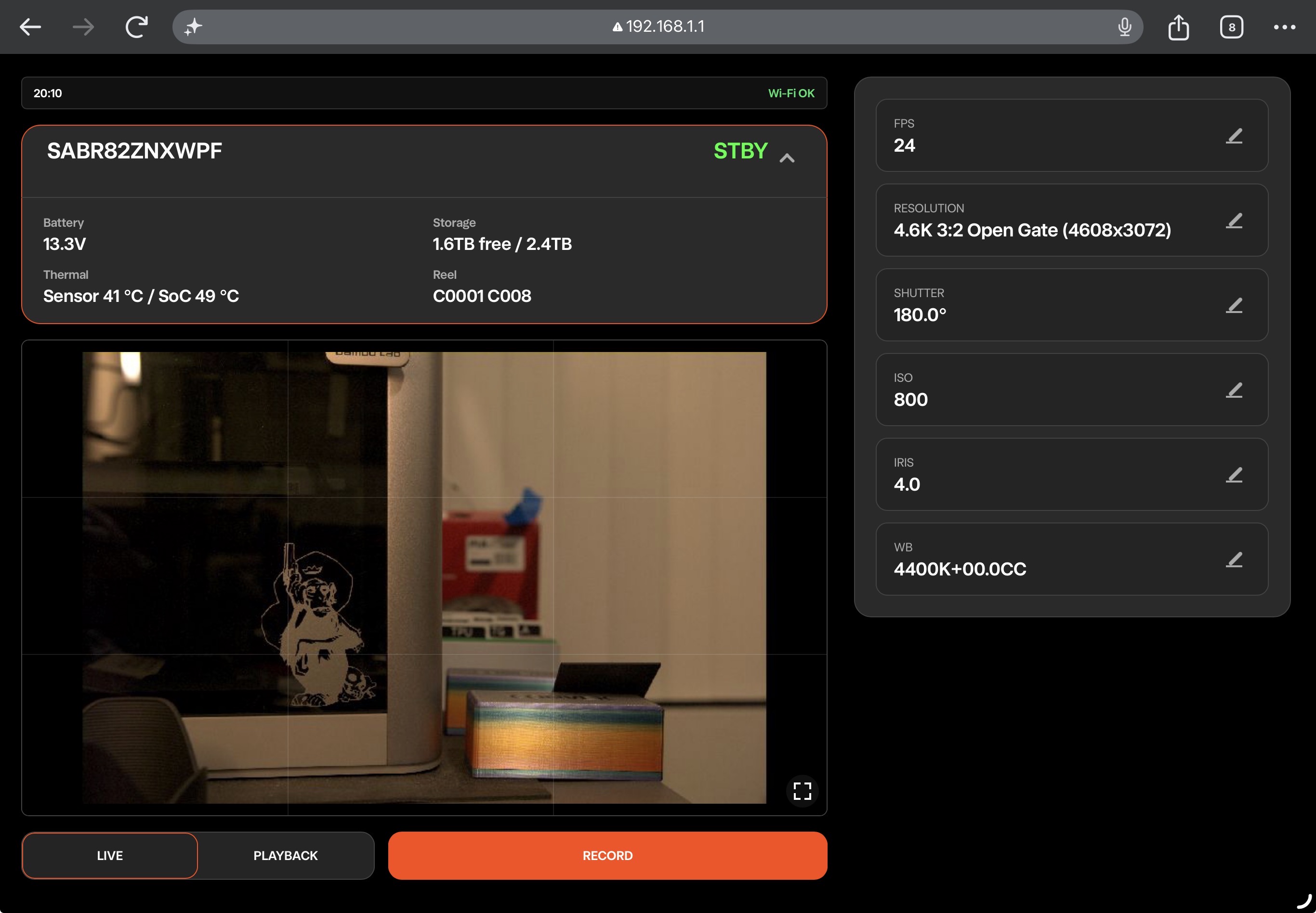
Besides camera settings, playback is also available as well as a record trigger. I was able to trigger my camera through two walls (and my TV and some metal shelving) about 35’ away, though at that distance (and through the walls) I had issues with playback not working.
Overall, it’s handy and works well enough (having experienced the camera WiFi connection on RED and Arri cameras). I’d like to see the ability to connect to a router to expand the range (right now the camera only functions as a host).
I’m curious what other people think about this new feature.