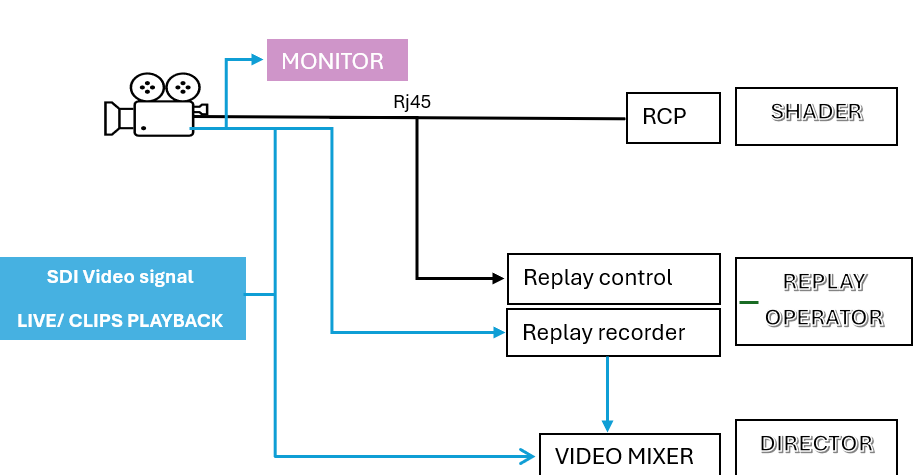
How about implementing Spark in a „live“ broadcast environment? All features needed are actually already there:
Continuous Recording
Two seperate Signal outs, a second SDI would be even better.
Ability to load LUTs, to match broadcast cameras.
Things that are missing:
Clean Feed out to OB-Truck
Playback Control via iPhone and App: fast search with search bar to find in point, than hit play button and next to the play button 5 user definable speed buttons (for example 1x, 2x, 4x, 10x and 20x faster for real time playback) to make speedramps if needed: so from 10x to 1x to 20x and to 1x again)
Timecode Set up only internally to find clips faster (like 18:15:56:50 meaning hours:minutes:seconds:frame)
Fast turnaround/switching between playback(thumbnail) and live-recording to hit record again.
Hi Nedo, this sounds great! Most of the features are already available or currently in development!
There’s one feature I’d like to confirm: Clean Feed out to OB-Truck. Could you clarify what exactly this means? For example, does it refer to using an SDI output to deliver a clean video stream without any overlays, menus, or parameter information?
this is exactly what it means, a clean signal without any overlays to the OB-Truck via SDI. Also the choice to switch the resolution between 2160p50/60 and 1080p50/60 or 1080i50/60, since a lot of broadcast production are still delivered in HD.
A second SDI out would be nice, since HDMI has more lags/delay. For fast moving things like Icehockey or other sports SDI is the way to go, to feed your viewfinder.
Here is an idea how you could design the replay window on the App
Hello all. I am also very interested in the development of this camera to implement in the broadcast workflow. As Nedo says, in addition to being able to configure the SDI output in various formats and sources. It is also necessary (and mandatory) to be able to control he colourimetry remotely, via Ethernet or wifi. There would be a possibility to implement this device to multi-camera RCPs, such as Cyanview or Skaarhoj?
I am trying to add this type of devices to the sports workflow, and the most important thing is colour correction from RCP directly to the camera (white balance, black balance, matrix, shutter).
If you are interested in, please don’t hesitate to contact me via PM
Yes, of course! One of the most critical parts of the live broadcast workflow is the unification of cameras in real time, i.e. all cameras have to have the same colourimetry and video levels. For this it is necessary to be able to control precisely and in real time the main parameters of the camera: colour temperature, black pedestal, shutter, LUT’s, multi-matrix and iris control (this last one depends on the lens…)
From a RCP, such Cyanview or skaarhoj, console or device where these parameters can be varied, the shader adjusts all the cameras in the same way.
Another important value would be to have two SDI video outputs, one for monitoring and one for live. But, for the moment, one is enough if you can switch Between live and playback clips. HDMI is not considered Broadcast…During live, director can put on air live signal, and also record one clip on camera. After the action, one replay operator trig the clip and play from the SSD on camera in slowmotion, recording this signal on the main replay machine. After that, he can play the clip in slow. Clips can be controlled from a normal device, such laptop or tablet, but camera must be controlled from RCP
Wow! Thank you for the detailed explanation! I will look into this further. I’m currently at IBC in the Netherlands—if there’s an opportunity, we could connect and discuss this in person!
I would love nothing more!!! but unfortunately we have just started the new season in Saudi Arabia and at the moment we have no travel plans in the short term.
Anyway, we will be in touch as we are very interested in developing this device with our workflow and add it from our special cameras department!
Bump! would be a great asset in a live sports environment. id 2nd the conversation with Cyanview to integrate control of the camera in their environment.
It would also be great to have multiple SSDs and two SDI outs.
Playing out slowmotion from one SSD while simultaneously recording to another one.
SDI 1 is for Live-View for the camera-operator and SDI 2 is for playback tto the OB-Van simultaneously.
Playback control via iPad and Ethernet connection over Fiber to the camera-body. Once you search for playout the camera automatically records to the next SSD.
Maybe a third SDI 3 out for live view for slowmotion operator?
This is incredibly helpful, thank you . One thing I want to make sure we understand correctly before locking the design: you mentioned one SDI for monitoring and one for live, and that HDMI isn’t considered broadcast.
For thelive feedpath back to the OB van / switcher, that’s totally clear — SDI (or fiber) all the way, HDMI is a non-starter.
But I’m curious specifically about theon-rig monitoring / viewfinderside. If the operator’s monitor is sitting right on the camera (sub-1m run), is there a hard reason HDMI won’t do there — latency on fast action? connector reliability? a facility rule? Most field monitors (SmallHD Ultra, Atomos, etc.) take HDMI in fine, so I’d love to understand what breaks inyourworkflow if local monitoring were HDMI and the single SDI were reserved for the clean live feed. Trying to figure out whether a second SDI is genuinely required or whether it’s mainly habit/preference.
Super helpful, thanks GinSir! Live feed to the truck = SDI, totally clear. But I’m curious about the on-rig monitoring side — most monitors (SmallHD Ultra, Atomos…) take HDMI fine over a sub-1m run. Is there a hard reason HDMI won’t do there for you — latency, connector, a facility rule? Trying to figure out if a 2nd SDI is truly needed or mostly habit.
It’s because HDMI has a history of being a very unreliable connector that also introduces some latency into the system. (This is the short answer)
SDI became popular for major productions because its a secure two conductor wire that can handle runs up too about 250ft without issue, that requires no handshakes, nothing from the upstream side other then a feed to be received by the monitor downstream.
Most broadcast cameras are in a live on-demand environment where the ability to repair them or fix random cable issues is not possible so yes they will want dual feeds if they can get it. Most live productions also have a SDI return piped to the camera so they can command functions such as color correction on the camera via the booth. (ie Blackmagic style cameras and switchers)
So Yes, any professional production tech is going to want SDI as their main source since its reliability is just higher and not a habit.
Yes, having twin feeds out one HDMI and the other SDI could work but you start introducing issues such as added latency, how far can that run be ran before boosting, long term wear and tear not the hdmi port etc.
The hdmi port was just never designed to be used on a set, being pulled and un plugged, long cable runs etc… It’s not a bad protocol but not for on set use.