All the arguments are understandable, but the Spak was actually developed for indie filmmakers and not for high-end productions… So a menu option for activation would be the best compromise…
Years ago, I was traveling in the rainforest and accidentally pressed the record button and forgot to stop it. The memory was then full; luckily I could delete it, otherwise I would have had to go home, which is also expensive…
Technically, if we wanted to do that, couldn’t we just plug the ssd into a phone and delete the file? Being an underwater shooter of course, this wouldn’t be an option.
I would like to know if doing this causes issues with long term read and write technical issues due to fragmentation as the devs are worried about. It would be no different to deleting in camera and continuing to write.
Also wouldn’t regular formatting help anyway? Deleting would only be an on location requirement for some.
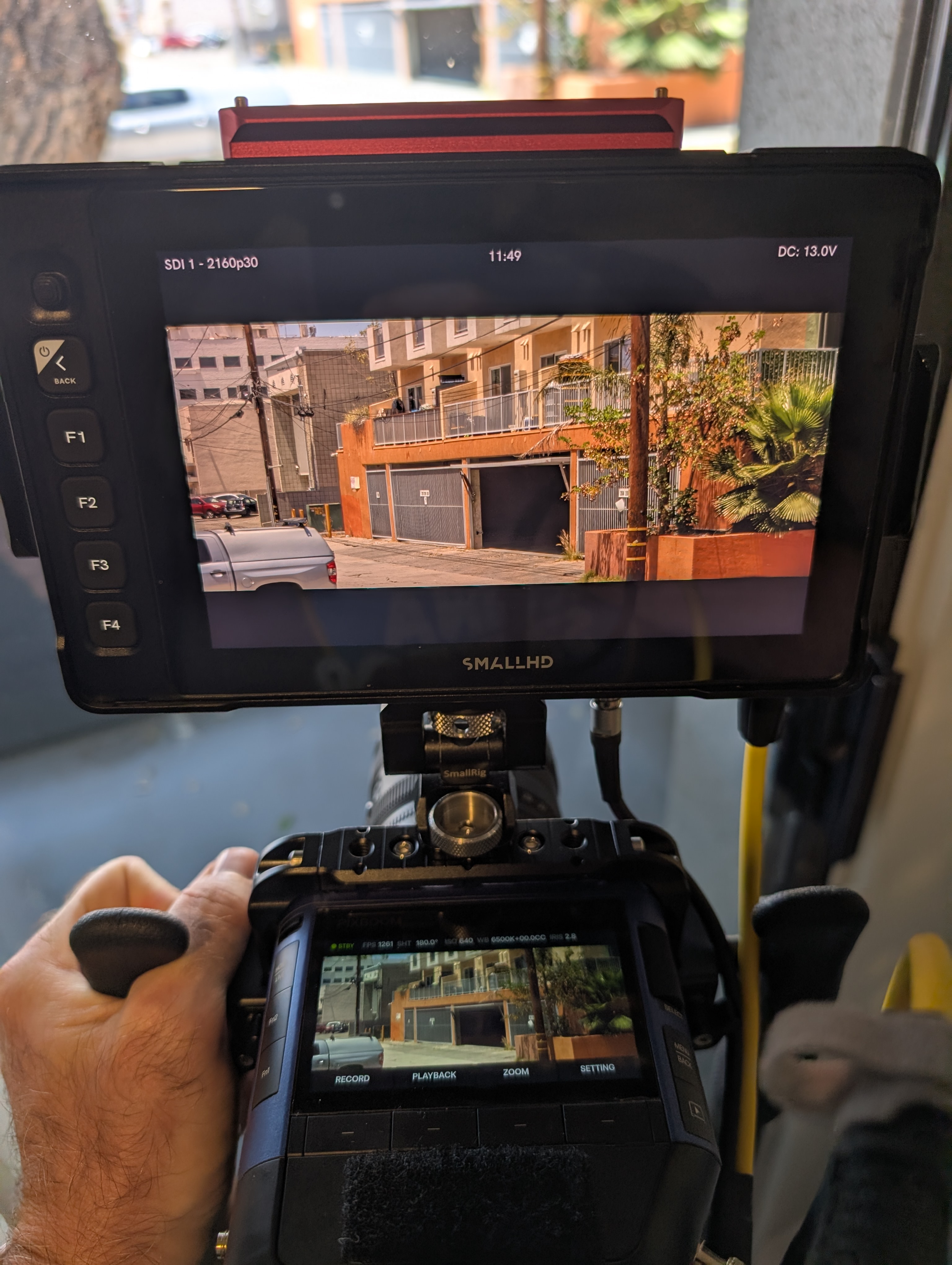
Hi everyone! I just updated the firmware on my camera and enabled SDI, but I’m not getting an image. Tried different cables and different ports on the monitor. Anyone else having this issue?
Sorry to ask the obvious, but did you set it to 4K and, if so, are you using a 4K compatible monitor and cables?
I will note that I just tried mine (set to 3840x2160 60p) and didn’t get an image on my monitor at first. I switched to 30p and got an image and then I could switch back to 60 and it maintained the image, though with occasional white lines and corrupted image blocks, something I didn’t encounter at 30. I’ll have to do more testing to see if I still get image glitches with different cables or monitor.
Current setup: SmallHD Ultra 7 with 12G SDI cable (Neutrik brand on the straight connector, not sure on the right angle).
I completely agree. The Spark was marketed toward indie filmmakers, small crews, and solo creators, not only large-scale productions with 50 people on set.
For filmmakers like us, the ability to delete individual clips is essential, especially considering the enormous data rates. We often work in remote or difficult-to-access locations where there is no laptop nearby and no dedicated data-management crew.
I once had a Freefly Ember mounted on a cable cam. I had built a custom remote trigger, and when I switched the remote off to save battery, it somehow triggered the camera. I only noticed around five minutes later, by which point the storage was full.
We were just about to film a stunt that could only be performed once. We then had to rush back into the house, connect the Ember to a computer, delete the clip, mount the camera back onto the cable cam, and raise the entire cable cam system again using the lifts.
It created a lot of completely unnecessary stress right before a one-time stunt. A simple delete function would have prevented the entire situation.
Even if deleting any individual clip is technically difficult or risky, being able to delete at least the most recently recorded clip would already be a huge improvement over having no delete option at all.
I understand the concern if deleting clips could negatively affect the drive or increase the risk of corruption. In that case, reliability should obviously come first. But I would still like to understand why deleting clips works with almost every other camera and storage medium, while it apparently cannot be safely implemented on the Spark.
I’ve seen a lot of discussion around whether in-camera file deletion should be supported. And I think the best approach would be to provide a solution that accommodates different workflows while ensuring data safety.
However, we still need to conduct thorough testing to fully evaluate the potential impact of this feature before deciding on the final implementation. We hope to address everyone’s needs in a future update.
Great to hear, you’re already dicussing project framerate, markers & different SDI frame rates.
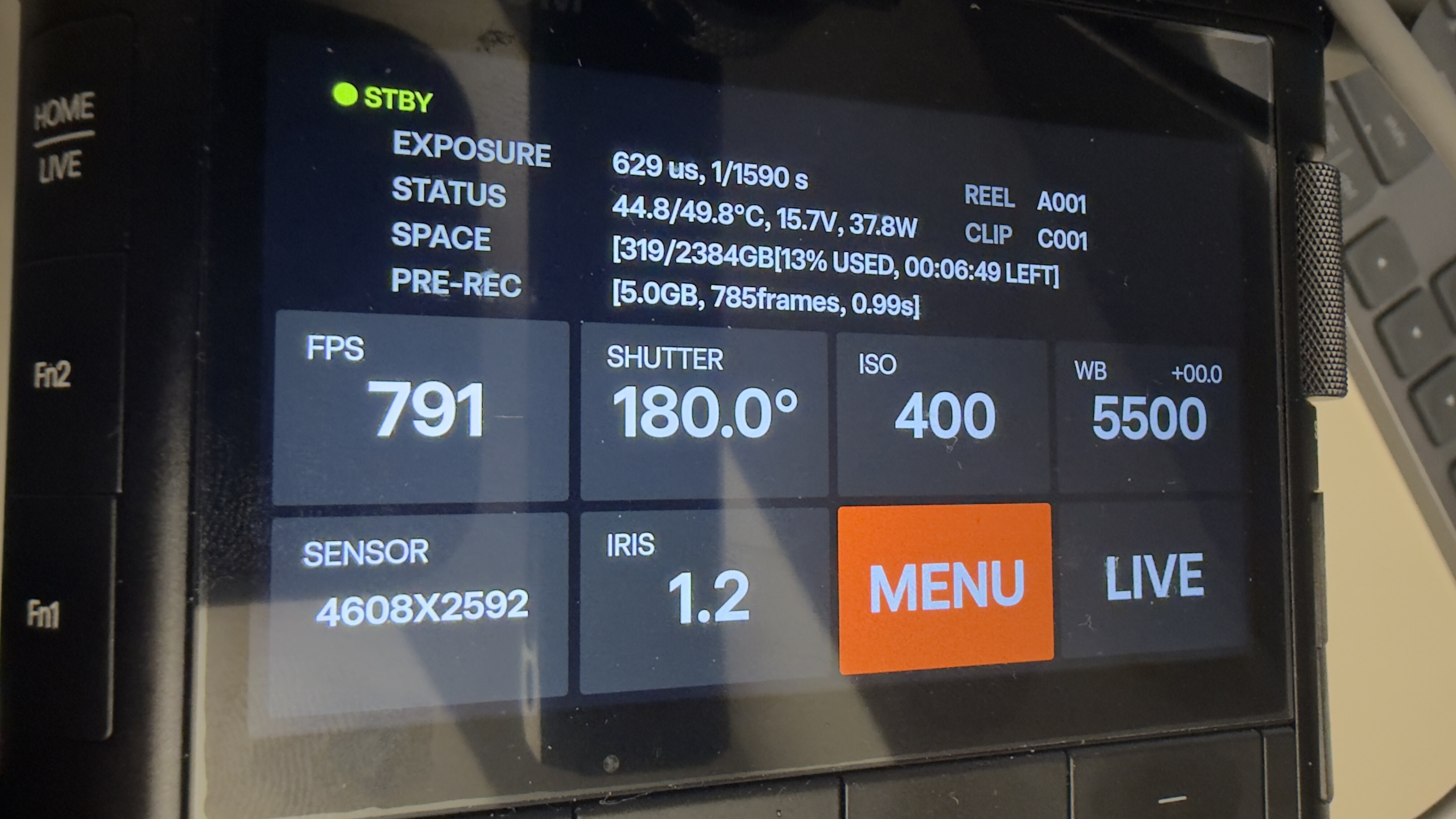
One more thing regarding SDI: It would be great to have a On-Screen-Display on the video outputs - so you can switch between Clean Video Feed and OSD Video Feed. This is done by nearly all cameras (ARRI, Sony, Canon, Freefly etc.) - just have a look. The OSD should contain all main informations / settings (Resolution of the sensor, FPS, Shutter, Whitebalance, Tint, LUT, Battery Voltage/DC Input Voltage, Remaining Space on the Card, maybe Iris/Focus if the lens supplies the information and maybe warnings or error messages - like temperature warnings) and of course a Record indicator (Standby, PreRec, Rec) - so everybody on set can see the informations on their monitors. The actual video can be resized a little so make space for the OSD (should be in front of a black background - not the actual image) .Maybe a Histogram/False Color/Waveform (of the full sensors dynamic range in RAW - not the LUT - like on RED cameras) would also be great on the OSD to get exposure right.
And maybe a little timeline with markers etc. when I´m in playback mode.
There are many cases where the actual screen on the camera cannot easily be accessed to see all the informations. And if working with a bigger team, all departments can see the most important informations about the settings on their monitors.
Posted that already in the thread about the tophandle, but it might be more a topic for software.
Good to meet you. Great work on the camera so far thank you guys
Thanks so much for the update, will be installing it soon.
Couple requests:
I think you guys would benefit a lot from the option of a slightly flatter or slightly lifted image coming out of the video feed of the camera - it would make it easier to expose the image to protect the highlights. The image seems to be unnecessarily crushed and looks pretty different from what the camera sees in the Pixboom Cine software. A more accurate representation of what the camera sees coming out of the video feed would be super handy.
To be able to switch on overlays on the monitoring would be super handy to be able to at least see record state of the camera.
I’d really love a display indicator that shows how full my SSD is so I can better estimate how much more I can still shoot.
This has already been mentioned, but I’d also find it very helpful if you could set in and out markers directly on clips in the Spark, and have those markers written into the file so that PBC can read and display them immediately.
Alternatively: being able to trim clips directly in the Spark. I often have a 15‑second (real‑time) clip where I only need about 3 seconds. The remaining 12 seconds are basically “unnecessary data trash” that fills up the 2.4 TB quite quickly.
When I shoot in 16:9, I have different maximum frame rates than in 9:16, even though the total pixel count is the same. Is there a technical reason for this?
Pixboom Cine
When I try to export a file to a location that doesn’t exist (for example, an external SSD I used for my last export that’s no longer connected to the MacBook), I get a failure message and have to close the export window. There’s no way to start the export again after selecting a valid destination.
General
I do not really have a solution for this, but I still wanted to bring it up. I’ve noticed that the update thread gets cluttered quite quickly with comments about what could be changed or implemented. Please don’t get me wrong – I really like many of the comments and I love the exchange in the forum. It just becomes a bit hard to keep track of everything.I think the overview that K.F.Wright put together previously in this thread is really great. However, it needs to be maintained and updated. I think if something like this came directly from Pixboom as a pinned thread that nobody can comment on, it would be a good solution. That way, you as the team could let us know what you’re currently working on and what you are not (yet). This would give us users a clear view of what’s coming next.
As I said, please don’t take this the wrong way. I really like the interaction here and I follow it almost daily.
Your frame rate differs between 16:9 and 9:16 because the VERTICAL pixel read out determines your maximum frame rate. Not just total pixel count. you can shoot full sensor width (4608) at 1920 high and the max frame rate will be the same as 1920x1920.
Hey man! When I read your explanation and saw the picture, I was like “Wait. I know that already. wtf was my point when I wrote it?!”. So welllll. Just ignore that point of my list
Thank you for explaining the readouts thing. Makes sense now to me!
First, thank you to everyone who has cataloged these ideas—there are a lot of great contributions here.
While much of the feedback comes from traditional studio and set cinematography, my background is in high-speed research, science, and ballistics imaging, as well as autonomous wildlife camera trapping. With those applications in mind, I’d like to offer a few feature requests that would expand the camera’s utility in specialized fields:
Finite Clip Duration Option
In high-speed workflows, receiving a trigger and recording a predetermined number of frames before automatically stopping is standard practice. Once the clip finishes, the camera should return to pre-record mode to await the next trigger. This automated, non-periodic sequence is critical in lab environments and remote setups.
Dynamic Slider for Pre-Record Duration:Replace or supplement manual digit entry with a dynamic slider for pre-record duration that continuously updates relevant memory amount, frame count, and time values in real time
Low-Power Sleep & Wake Mode
For long-term, remote camera-trapping deployments, an intelligent power management state is essential. Ideally, a primary signal would quickly wake the camera into a pre-record state. A second signal would trigger a finite-duration recording, after which the camera returns to pre-record. If no further activity occurs within a defined timeout window, the camera would return to sleep. Implementing this would make this the first high-speed camera in its class capable of extended autonomous field deployment.
In-Camera Clip Deletion (Selectable / Hidden Menu)
While preventing accidental deletion is critical in a high-stakes production environment, managing limited storage in the field—such as on a canopy platform 90 feet up a tree for four days—presents very different operational constraints. A global “Enable/Disable Clip Deletion” toggle in the initial setup, buried behind a confirmation prompt to prevent accidental activation, would accommodate both production safety and field necessity.
Per-Frame TTL Output Sync Signal
Providing a per-frame TTL sync output aligned with the start of each frame exposure would allow integration with strobed, high-intensity LED systems (e.g., GS-Vitec). Driving illumination on a low duty cycle eliminates thermal management issues inherent to continuous lighting while dramatically reducing motion blur for sharper imagery.
I recognize these requests lean toward specialized applications rather than traditional narrative cinematography. However, supporting these capabilities could open significant sales opportunities within scientific, defense, and high-speed research sectors currently dominated by platforms like Phantom.
Hi @MurrayYin! I had a few Pixboom Cine Software / feature suggestions if they are not already being considered
False colour and/or RGB waveform monitor and histogram in Pixboom Cine so we can increase exposure etc. in the settings and see when we are going to clip highlights in our exports.
Save image settings as custom presets, so, for example, I always export as 25fps or if I always apply a little CC, lightness or saturation, I could save this as a preset I can quickly then apply to any other clips.
Batch rename / add title prefix to exported clips
Assignable keyboard shortcuts for all functions, but also one to remove existing IN and OUT points (for when taking several exports from the same .pxbc clip, and you would like to clear the old IN and OUT points to make new ones).
There appears to be a bug in the current version of Pixboom Cine on Mac, where under the clip’s metadata, it often shows ISO as “0”. Could this be fixed please?
Dark mode! I would love to be able to switch the whole interface to a dark look, similar to DaVinci Resolve or Final Cut Pro.
Also, are there any plans for an iOS app to view and export clips from the Spark’s SSD on iPhones / iPads and control live camera settings remotely?
Also, would you consider making an .fxplug plug-in for Final Cut Pro to be able to import, adjust and edit .PXBC clips natively?
Many thanks for a fantastic product! Looking forward to the new software and firmware revisions!

 Just ignore that point of my list