That’s already in development. Last we heard they were targeting ProRes RAW for late this year: Software Progress, Accessories, and Final Pilot Production Validation - #29 by Admin
Can’t find pixboom software on Mac App Store
What is the software called? Did you have to take it back down for some reason? Hope I can find it soon! Thanks.
sorry, I just found it! Even though I typed in pixboom I had to scroll past about 50 other apps first.
I didn’t realize they had put it in the app store yet. Direct link to the Apple App Store here:
May I ask a quick follow-up so we can better understand your needs around Log? Is your main goal to better identify and avoid highlight clipping, retain more shadow detail, or use a custom preview LUT?
Supporting Log involves broader changes to our imaging pipeline and will require more time to prepare. In the near term, we have already made exposure-assist tools a high priority and are actively exploring possible solutions. We hope these tools can address some of your concerns sooner, particularly around judging highlights and exposure during preview.
Hi Murray,
Nablet, a company specializing in media extensions, may be interested in talking to Pixboom about adding native Pixboom RAW support to their media extensions for MacOS, which would then allow users to use native Pixboom RAW files in Final Cut Pro 12, amongst other apps. I, for one, would find this functionality extremely useful.
They have asked for contact details for the right person at Pixboom to discuss the possibility of making this happen. The development cost might require sponsorship, but this can be discussed.
If you’re interested, would you be able to give me an email address for them to contact you or whoever is the best person to talk to and I will forward this on to them? Please expect an email from somebody at Nablet.
Many thanks
George
Regarding requirements for Log, the main priorities for me would be all of the things you mention in this order of importance: 1. to give a smoother highlight roll-off and greater scope for manipulating the image in the grade, 2.retain more shadow detail and 3. to have a custom preview LUT.
If the LOG curve was engineered to behave as close to an existing established gamma curve as possible, eg SLOG3 or Arri LOG, this would allow us to use a wealth of existing after-market LUTs that already exist. However, not being versed in how these things operate, a new log curve “P-LOG” would also be acceptable, if a suitable cube LUT for monitoring and post work is supplied.
The ability to output the LUT live on the Pixboom screen, SDI output and HDMI output would also be extremely useful. If you could toggle some, but not others, even better.
Many thanks!
Let me dive in a bit:
I work both in the commercial and feature film market in the US and on all bigger shoots a DIT monitors LOG coming out of our camera and runs the entire image pipeline. Needless to say having already having LOG in the post process (unlike the Freefly Ember) is massively helpful to sculpt the look and push the image. Big thanks for making that happen!! But the current Rec709 look is unfortunately not a true 709 the way for example an Arri 709 or Sony 709 would look - it has a much harsher contrast and really horrible highlight clipping. As such it makes it pretty much useless for me.
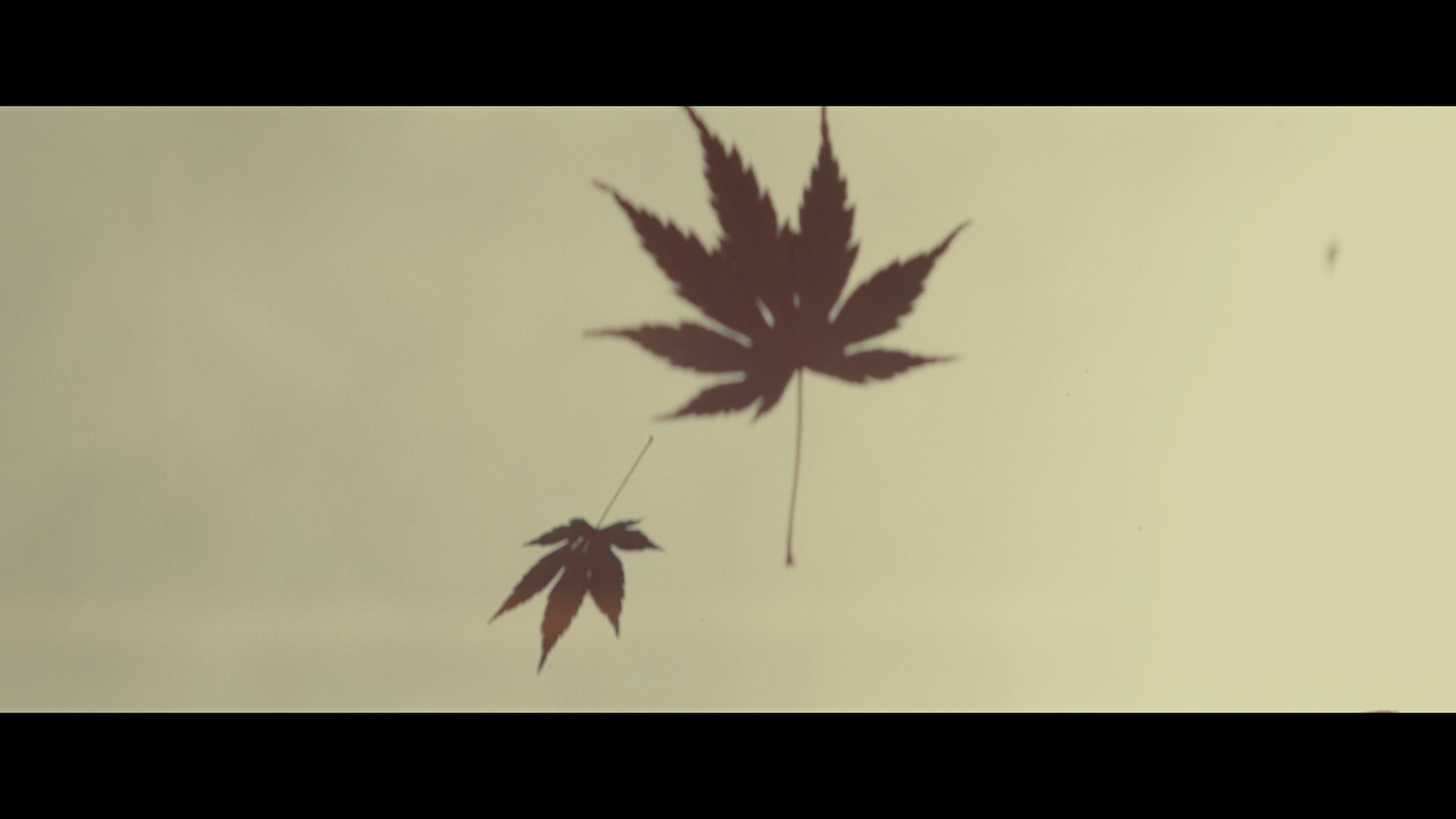
To give you an example, when I rented @K.F.Wright 's Spark for a shoot a couple weeks ago in LA we were doing a backlit shot of falling maple leafs. We were shooting against the sky with the sun just barely outside of my frame.
On screen this shot looked horrible, sky completely blown but I also didn’t want to underexpose too much to lose color of the maple leafs. I played around with the exposure for a while and landed on an exposure that looked like a decent compromise between shadow and sky retention.
The unfortunate thing was: I did not know if we actually got the shot or if we ended up with a massively blown out sky and had to tell the producer that there was a chance we’d have to reshoot after lunch, once the DIT had ingested the footage and we had a chance to look at the DNGs. As a DP thats a horrible position to be in. Many shoots these days move so fast, there simply is no ‘second chance’ and with a critical shot it might mean the end of a relationship with a director and/or production company if we miss getting a shot right.
Luckily the exposure was pretty spot on and the highlights were all there - but did I actually maximize the leverage of the Spark? I still don’t know because I couldn’t roll through the exposure on set and judge the real highlight information that would only be visible in LOG.
Now for all the guys out there saying the Spark is primarily used in markets that don’t rely on live-grading or even have a DIT: I shoot tons of personal projects where I just run around with a camera by myself. For each project I am building my own “shooting LUT” that I use to monitor and expose for the specific look that I am going to - again this look would be based of the LOG that I am seeing in Resolve.
Especially for run and gun work lighting conditions could less than ideal. You will find yourself in massively backlit situations and to avoid the risk of blown highlights (that I absolutely can’t stand) I’d be forced to underexpose a lot more than necessary. Again, just a really unfortunate situation to be in and not maximizing the sensor and what the DNGs can actually do.
For my personal priority list:
-
Fix the Rec709 to match an industry standard Rec709 that gives proper highlight and shadow information. The image alone should be showing if my highlights are clipping - if they are clipped on the Rec709 but I still actually have 2 more stops in the DNGs that is very confusing and does not inspire confidence.
-
Implement monitoring LOG - bonus of course would be to also allow loading LUTs but worst case they could be added in a in-monitor-pipeline. Lets please get this right. This was honestly one of the elements where Freefly screwed up with the EMBER - never really refining their color workflow and Pixboom has a massive opportunity to step ahead if you all get this right.
-
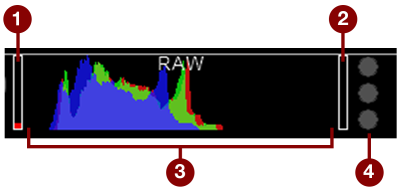
Implement exposure tools. The one thing RED got right in the early days was their exposure tool. Having a small histogram, shadow clipping on the left (1) and highlight clipping on the right (2), plus the stoplights to indicate if individual RGB channels were clipping. I wish I would have this tool on the Venice 2 and A35.
- Last but not least: please activate monitor overlays. At a bare minimum a recording indicator. Ideally allowing an overlay that shows all shooting settings.
Thanks for listening to my lengthy explanation. Spark is already great and I see how much more potential it has - if we can implement these changes, the camera will be an absolute killer!!
THANKS!!!
4 Likes
Thank you for the introduction! I’ll send you my email address via DM.
Just wanted to say I agree with your requests and all for very similar reasons. This is a good opportunity to take a big chunk of market share from the more established and well known Ember.
1 Like
Thank you for your response and the very detailed explanation. I truly appreciate it—it helped me fully understand the issue and your needs.
I’m currently researching this in depth and exploring potential solutions. We’ll treat this as a high priority and focus on finding a solution. We’ll address the issue step by step and do our best to meet your needs.
I’d also like to ask a follow-up question: when you mentioned that the DNG files appeared correctly exposed and retained the highlight detail upon review, were you viewing them in Pixboom Cine or DaVinci Resolve?
2 Likes
Thank you, I really appreciated it!!
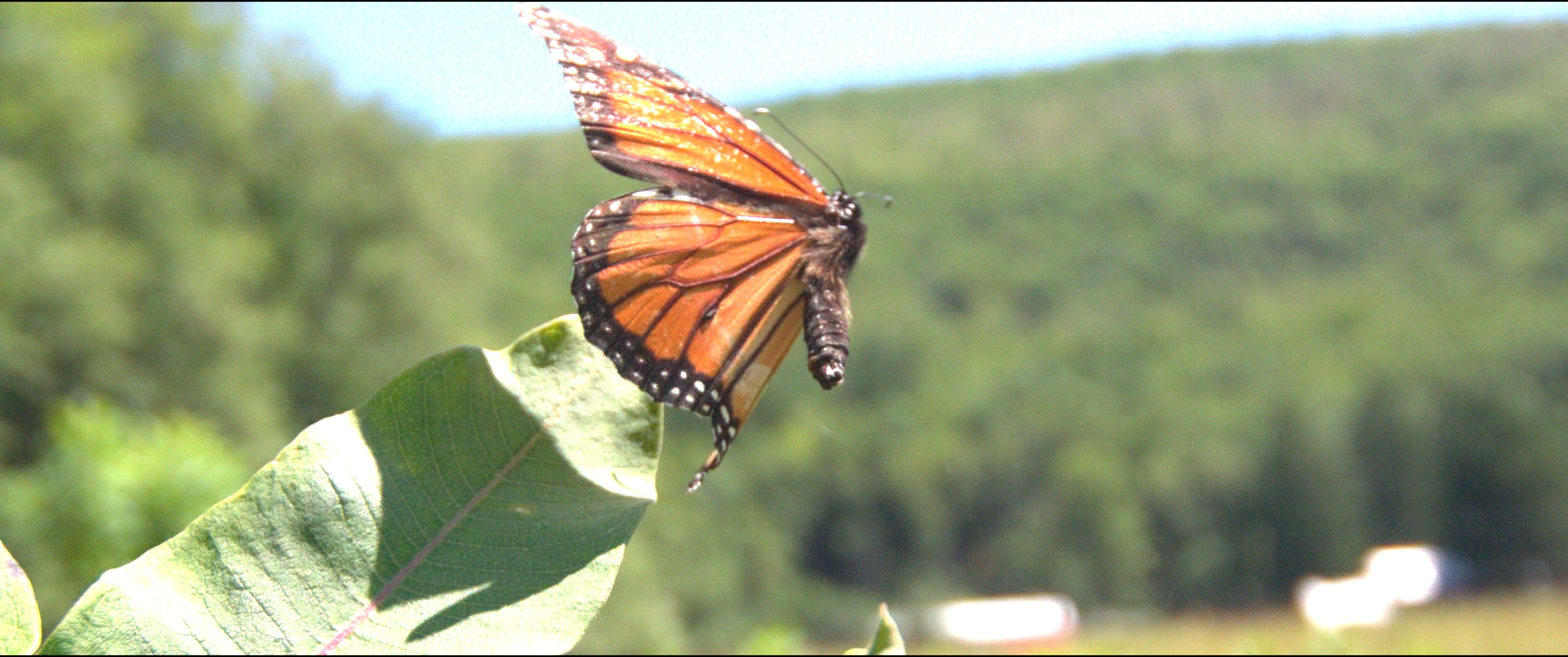
I was not aware that you can view the CineDNGs in Pixboom Cine? I’ve only used the software to trim the RAWs and export DNGs. The look of the RAW file in Pixboom and the CineDNGs is matching in Resolve as long as the metadata stays unchanged.
But the moment I change the RAW settings in Resolve from 709 to Blackmagic Design Film, I can actually work with teh full potential and get the extended dynamic range.
Look in Pixboom Cine and Resolve (when set to Rec709):
Changed in Resolve to Blackmagic Design:
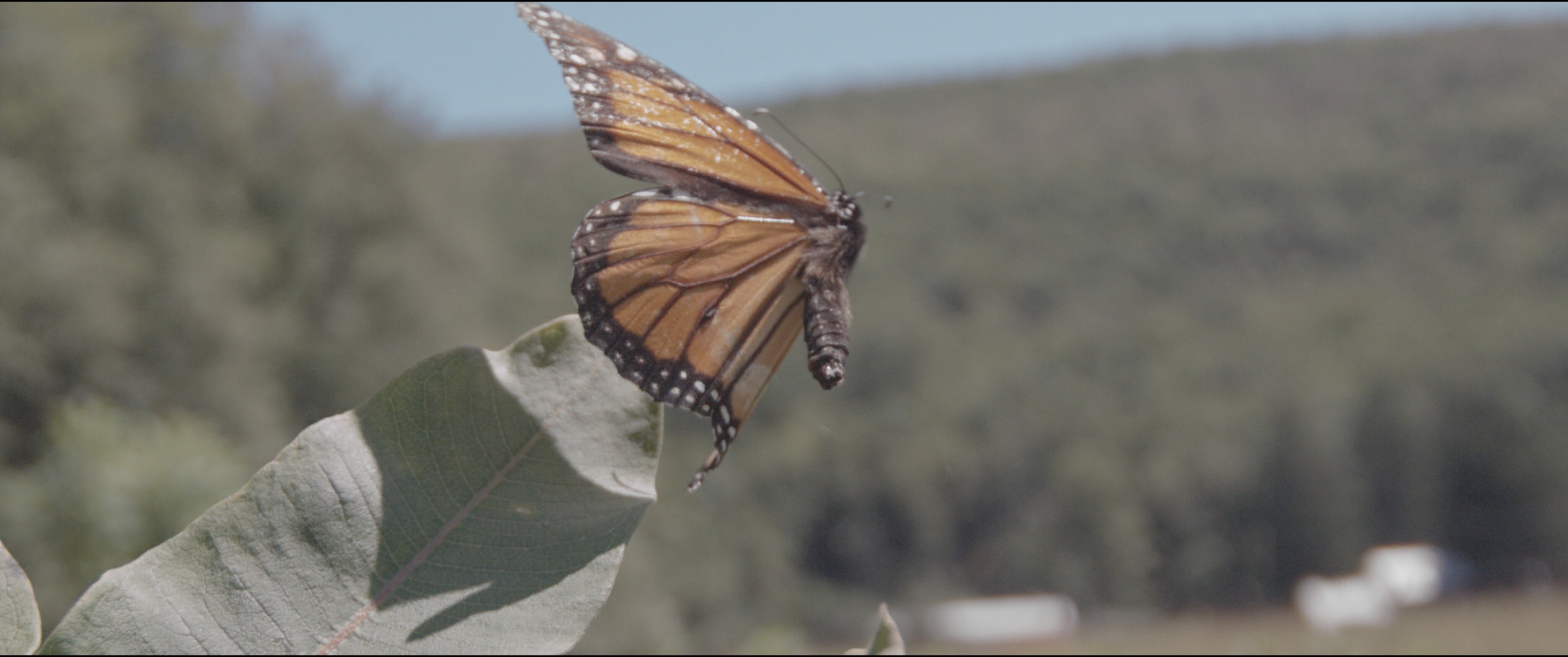
LOG image with CST, creative Slog3 LUT, small RAW adjustments and film-emulation.
Thanks again!!
1 Like
Sorry, I didn’t explain myself clearly. What I meant to ask was: did our RAW footage already appear correct when viewed in Pixboom Cine, or was the issue corrected after viewing the DNG files in DaVinci Resolve?
Thank you again for the detailed explanation. If convenient, could you please send us the DNG files from this case? We’d like to investigate the issue further. Thank you!
One more follow-up question: did you have Highlight Recovery enabled when viewing the DNG files in DaVinci Resolve?
Is there a way to view LOG in Pixboom Cine, or anything other than the Pixboom 709 look? As far as I’m aware, DNG exports are the only way to see the footage without the overly aggressive Pixboom 709 look, which clips highlights way too early whether viewing in Pixboom Cine, Resolve, or any other playback program.
Don’t worry ~ we recognize the importance of implementing a Log workflow and are treating it as a high priority. In the meantime, I’d like to understand exactly where the issues lie within the current 709 pipeline.
1 Like
Hi everyone,
Our latest firmware update, v1.2.0, is now available! You can download it from the Downloads section and give it a try. If you encounter any issues, please feel free to share your feedback at any time.
We’ve also received your various feature requests and suggestions for improving the user experience, and we’re actively working through them. Please stay tuned for future updates.
Thank you again for your continued support!
1 Like
Awesome! Thanks for this! 
Thanks for the update - it is working well on my camera.
Buffering is great, however I would like it to operate in Prerecord as well.
The Rationale of what I want:
I have a camera focused on a birds nest, nesting cavity, or a feeder. I am trying to get clips of the bird arriving and leaving. I set the camera up with a half second prerecord, and I am using a ‘pickle’ switch to start/stop recording. If the bird leaves, I have half a second to press the pickle switch and still capture the launch. Once out of frame, I stop the recording. I want the camera to go straight into Prerecord again, ready for the next arrival or launch. So all I am doing is starting and stopping clips. I don’t have to predict action - I have half a second (or whatever I set) of time to react. In the existing mode, I have to predict launches and arrivals.
Hope this makes sense.
Cheers,
Roy.
Updating and bumping with the release of the new firmware v1.2.0. Some of the “fixed” items I listed under v1.2.0 may have actually been fixed with v1.1.0, but I didn’t go through and test all those things with that previous firmware.
I don’t mean to be annoying or spam the thread, but figure this is the best way to keep this information accessible and from getting buried as the topic gets more posts.
Hardware
- Some light leaks from internal lights due to gaps in panels (not widespread, just one isolated case so far).
- Various reports of camera freezing on startup or after making changes. These reports are being addressed on a case by case basis.
- Hardware record buttons sticky and/or easily triggered
- Currently no side handle hardware to make use of side POGO pins. There is a thread sourcing input on an official handle.
Image
- Sensor stitch line showing up for some users (could potentially be fixed with a manual black shade option in the software). Pixboom engineering is looking into the problematic cameras.
- Blue/Yellow bands at top and bottom of extremely cropped sensors (low resolutions like 256x32). Engineering is looking into this.
- Sensor flip mode requested. This is in development.
- Ability to perform sensor calibration/black shade
- Ability to perform dead pixel calibration. This is in development.
Menus/Interface/Buttons
Pixboom has said they’re redesigning the Live View interface, which may address many of these things.
- Menu driven iris changes can only be made on the Home Screen, so I can’t see the Live view while making the changes (using the built in screen). See Live View interface update link above.
- Fn1 and Fn2 buttons don’t change settings while rolling.
- Settings changes (such as iris stops) don’t take effect until after selecting the value we want and then also selecting “Set,” which makes it cumbersome to scroll through and test how they change the picture.
- The settings should change as soon as we tap a new value and not make us also tap “Set.
- Scroll wheel not able to change settings after pushing a Fn1/2 button. Request noted and being evaluated.
- When making changes using the Fn1 and Fn2 buttons on the Live screen, accessing the Setting page at any point after having first accessed the Menu screen will cause the displayed value of the setting changed earlier by the Fn button to not match the actual value the camera is using.
Monitoring
- No LOG output. Currently being discussed between Young and users.
- No exposure tools
- Plugging in HDMI after booting up can cause the camera to cease working (requires power cycling)
- No overlays or on screen recording indicators
Media
- Camera boot up time without media installed takes 3.5 minutes and gives an error message
- No “eject media” function (despite camera door saying to eject beforehand)
- Hot swapping media without powering down locks up camera
Playback
- Ability to change playback behavior (loop same clip, automatically advance to next clip, etc.)
- Ability to mark “good takes” in camera
- Ability to mark in and out points on takes
- Improve playback scrubbing with scroll wheel. Scroll wheel makes very minor time jumps and is glitchy.
User Manual
- No documentation on proper media ejecting practices
Pixboom Cine Software
(I’m including Pixboom Cine software requests in this section rather than the general requests section)
- No ability to export non-LUT footage except for DNG format. Currently being discussed between Young and users.
- No hot key support for setting in/out points, etc.
- No ProRes or H.265 export support on Windows. This is being looked into.
- Export frame rate resets to 24fps every time the program is opened. This should be a perpetual setting, so Europeans can select 25fps and it’ll stay that way until they change it. Possibly being fixed, see above link.
- No exposure tools. In roadmap discussions. Again, see previous link.
- No way to reset/clear in/out points in a clip when they’ve already been set (if I’m understanding point 1 correctly)
- No ability to save frequently used settings
- No batch rename ability (especially needed with current inability for the camera to correctly name roll numbers)
- Bug (on Mac) where ISO value in metadata shows as “0”
- Please add dark mode interface
- If exporting to a location that doesn’t exist and getting a failure, there is no way to start the export again once selecting a valid destination without closing the window
- Resolution setting “Original” does not always match the original clip resolution.
Feature requests
- Auto fan speed control (camera will speed up or slow down the fan automatically, depending on temperature.
- Ability to add center markers to monitoring
- Ability to adjust iris while rolling
- Auto white balance. Suggestion noted for consideration.
- In camera custom LUT support
- Better (or custom) “user” resolution names. Either let us type in a custom name (such as “3.8K 16x9 3820x2160"” or “2K 2.4:1 2048x853”, etc.) or at the very least have the default “User” title also include the aspect ratio (such as “User 1.78 3820x2160,” “User 2.40 2048x853,” etc.). Right now it’s just “User” and the resolution, so then I have to do the math to figure out the aspect ratio when scrolling the list.
- DaVinci Resolve, Final Cut and Adobe Premiere native PXBC support
- Remote control SDK. Young has asked for input on workflows.
- Flair integration for robot arms
- Record limit setting (to stop rolling after a predetermined amount of time - useful in case somebody forgets to cut)
- CAD, 3D models, or technical drawings of camera hardware so people can model and design accessories. Include wiring diagrams for pinouts for cable design.
- Ability to send an overlay feed with relevant camera data to an external monitor. Maybe have 3 settings: clean, basic (record tally light and maybe a couple basic things like timecode, card time/space remaining, clip number - just the things video village might need to see) and advanced (all the settings like iris, shutter, iso, etc. Maybe these can be customized by the user on what items they want included).
- Ability to record proxy files in camera. Pixboom is looking into whether this is possible on the hardware.
- Add project frame rate setting. In discussion with development team.
- Longer pre-record times
- Speed sensitive scroll wheel
- Clip deletion and/or trimming in camera. This is being evaluated.
- Low power/sleep mode
- Per frame TTL output sync (to sync with strobes)
- After using prerecord, rolling, and then cutting, should have a settings option for the camera to automatically enter prerecord mode again.
Upcoming features in active development
- 12-bit recording mode (cuts frame rates approximately in half)
- Mobile/Web app.
- Remote control is currently a priority (as of July 2026)
- ProRes recording. Possibly by late 2026.
Fixed and added features
v1.0.1 (June 4, 2026)
- Anamorphic desqueeze “radio” fixed to “ratio”
- 4K over HDMI enabled
v1.1.0 (July 15, 2026)
- SDI enabled (can be used simultaneous with HDMI)
- Pre-record can now be canceled: press and hold record button
- Physical button control improved
- Fixed inconsistent scroll wheel functionality across settings and menus
- Added 4x Zoom button on Live screen
- Added additional anamorphic desqueeze ratios, ability to program in custom ratios, and vertical desqueeze options.
v1.2.0 (Aug 7, 2026)
- Expanded SDI output frame rate support: Added support for additional output frame rates, including 24, 25, 48 and 50 fps.
- Fixed - New file naming system: Supports custom camera index and reel number, with automatically incrementing filenames.
- Added - New Buffer Recording mode: When pre-recording is stopped in Buffer mode, the buffered footage can be saved directly without starting normal recording.
- Added - Playback page enhancements: Use the control wheel to fast-forward or rewind during playback, or step forward and backward frame by frame while paused.
- Fixed - Improved page navigation: The three physical side buttons now provide smooth navigation between pages.
- Added - New UART control commands: Detailed command documentation will be available soon in the Downloads section.
- Improved - Playback scrubbing is now smoother.
- Fixed - MENU/BACK hard button works inconsistently across menus
- Fixed - MENU/BACK hard button not working on Live screen
- Fixed - Custom camera settings are maintained after firmware update.
- Fixed - Inconsistent hard button/soft button functionality (sometimes one works while the corresponding other button doesn’t)
- Fixed - Inconsistent scroll wheel functionality across settings and menus
- Fixed - Fn1 and Fn2 buttons don’t change settings from the live screen.
User Manual v1.1
- Fixed - Manual incorrectly lists lens mount screws as 3.0mm hex, but is actually T8 Torx.
- Fixed resolution and frame rate chart listing incorrect horizontal resolution for sub 4.6K settings.
Pixboom Cine v0.3.5
- Added anamorphic viewing and export - Preview and export footage with horizontal or vertical desqueeze, making it easier to work with anamorphic lens material.
- Improved high resolution export - Better stability for 4K+ and desqueezed video exports, reducing the chance of stalled exports or abnormal output files.
- Clearer export guidance - Original resolution is now shown more clearly, with improved format guidance for large-size video exports.
- Better batch export error details - When multiple files fail during export, the error summary can now be fully viewed and scrolled for easier troubleshooting.
- Improved highlight rendering - Reduced pink / magenta artifacts that could appear around bright highlights or high-contrast edges.
- UI and workflow refinements - Improved export progress, completion messages, dropdown behavior, and window layout stability.
2 Likes